Mission Control
An AI Operating System for your whole personal stack: one local screen that runs it all.
- 11Repos tracked
- 9Skills in catalog
- live SSERuns
Opens the live dashboard with synthetic sample data in a new tab: browse the real interface.
How you’d use it
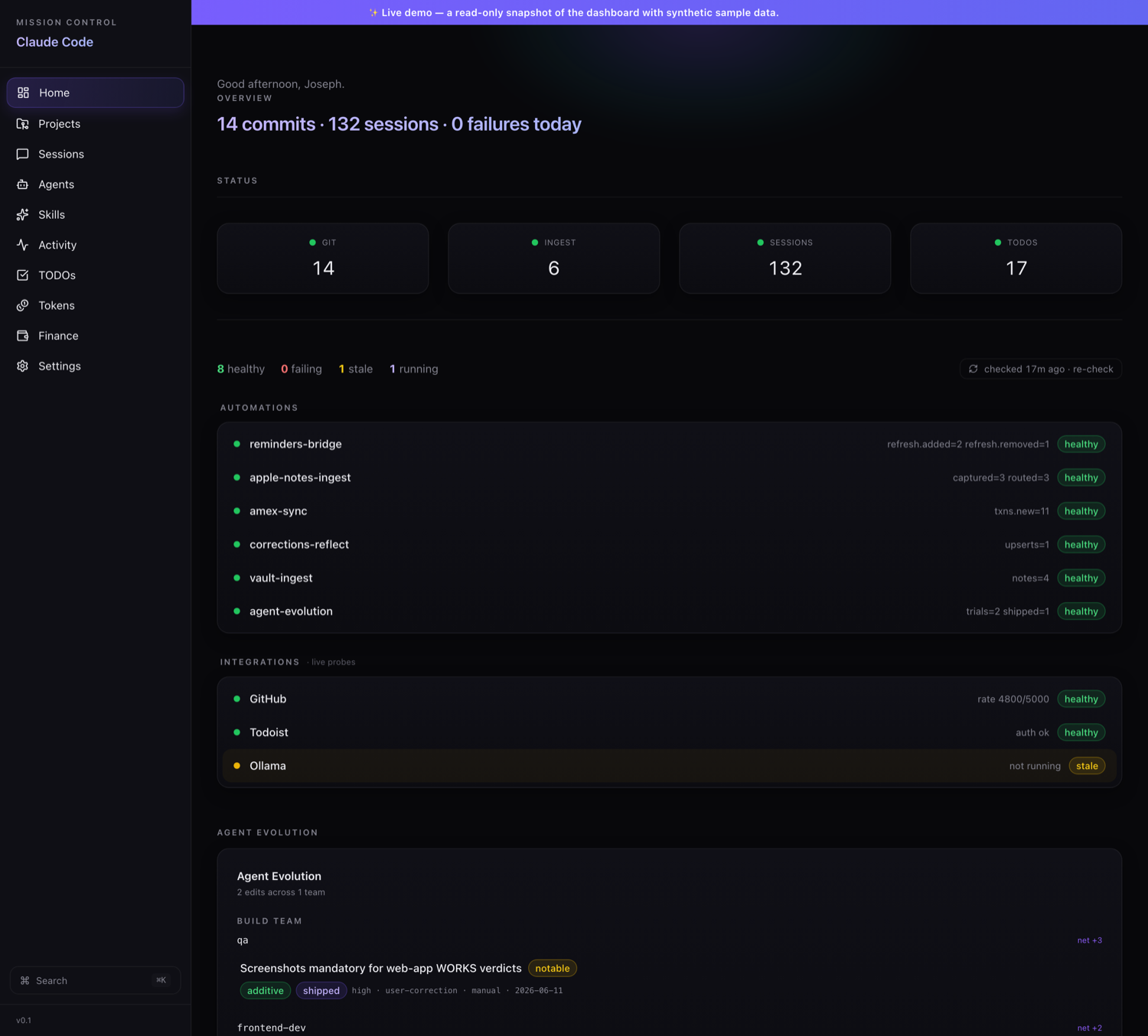
One local dashboard that catalogs every skill you have, launches any of them from the browser with live progress, tracks what your AI work costs, and tells you the moment any automation goes quiet.
Open it in the browser
It is always running locally, so the dashboard is one tab away, no launching anything.
See your whole stack at a glance
Today's git activity, token spend, and a green/amber/red dot for every service and automation.
Run a skill from the catalog
Pick any installed skill and launch it; watch its live progress without touching a terminal.
Check what broke
The health view flags anything that has gone quiet, so you fix it before it bites.
How it’s built
Most dashboards only display information; this one also runs things. It gathers everything into one place (that's the "aggregator" part) and adds a control layer on top. Four pieces do the work. A skills launcher starts any of my AI tasks by running claude -p (Claude from the command line) and streams its progress back to the browser live, using SSE (a one-way real-time feed from server to page). A scheduler, built on launchd (macOS's built-in task runner), handles anything that needs to run on a timer. A health monitor checks every service on its own clock, so one slow check can't freeze the rest. And a usage ledger tracks what the AI costs, broken down by model, session, and project. The tricky part was telling a stalled job apart from one that's supposed to run forever (a daemon), which I solved by letting those long-running jobs flag themselves so the monitor doesn't cry wolf.
- Makes every past Claude Code conversation searchable (full-text search over a local SQLite database) with a clean reader for any session
- Launches my AI tasks from the browser and shows their progress live as they run (streamed over SSE, a real-time feed)
- Tracks what my Claude AI usage costs, broken down by model, session, and project
- Shows what each project connects to: the AI tools, logins, and add-ons it plugs into (MCP, OAuth, and plugins)
- Keeps an eye on my background automations and services, and flags anything that has gone quiet
- Next.js
- SQLite (a fast local database, with full-text search)
- SSE (live server-to-browser updates)
where I’m taking it
Unifying the two run sources into a single live activity feed.
Want to use this?
Request access, ask how it works, or have me adapt it.
- Type
- App
- Category
- Personal Automation
- Status
- Live
- Built with
- Next.js · SQLite (a fast local database, with full-text search) · SSE (live server-to-browser updates)